"use client";
import DimensionalWorkflowHero, { type ScrollExperienceContent, type BuildChapter } from "@/components/ui/dimensional-workflow-hero";

function DevelopmentPanel({ chapter }: { chapter: BuildChapter }) {
  const site = chapter.finishedSite;
  return (
    <>
      <div className="panel-top">
        <strong>{chapter.name}</strong>
        <span className="panel-status">{chapter.status}</span>
      </div>
      <div className="build-scenes">
        <section className="build-scene data-scene">
          <div className="build-label">
            {"DATABASE "}
            <span>{"Illustrative project schema"}</span>
          </div>
          <h3>{"A foundation for the product."}</h3>
          <div className="db-toolbar">
            <b>{"pages"}</b>
            <span>{"3 records · public schema"}</span>
          </div>
          <table>
            <thead>
              <tr>
                <th>
                  {"id "}
                  <small>{"uuid"}</small>
                </th>
                <th>
                  {"slug "}
                  <small>{"text"}</small>
                </th>
                <th>
                  {"title "}
                  <small>{"text"}</small>
                </th>
                <th>
                  {"status "}
                  <small>{"text"}</small>
                </th>
              </tr>
            </thead>
            <tbody>
              <tr>
                <td>{"page_001"}</td>
                <td>{"/"}</td>
                <td>{"Home"}</td>
                <td>
                  <b>{"published"}</b>
                </td>
              </tr>
              <tr>
                <td>{"page_002"}</td>
                <td>{"/calculator"}</td>
                <td>{"Calculator"}</td>
                <td>
                  <b>{"published"}</b>
                </td>
              </tr>
              <tr>
                <td>{"page_003"}</td>
                <td>{"/dashboard"}</td>
                <td>{"Dashboard"}</td>
                <td>
                  <b>{"published"}</b>
                </td>
              </tr>
            </tbody>
          </table>
          <p className="build-note">{"Organized content. Clear relationships. Room to grow."}</p>
        </section>
        <section className="build-scene code-scene">
          <div className="build-label">
            {"APPLICATION "}
            <span>{"Illustrative React component"}</span>
          </div>
          <div className="code-tab">
            {"Page.tsx "}
            <span>{"TypeScript / React"}</span>
          </div>
          <pre>
            <code>
              <span className="code-purple">{"type"}</span>
              {" Page = {\n  title: "}
              <span className="code-blue">{"string"}</span>
              {";\n  description: "}
              <span className="code-blue">{"string"}</span>
              {";\n};\n\n"}
              <span className="code-purple">{"export default function"}</span>{" "}
              <span className="code-mint">{"Hero"}</span>
              {"({ page }: { page: Page }) {\n  "}
              <span className="code-purple">{"return"}</span>
              {" (\n    <"}
              <span className="code-mint">{"section"}</span>
              {" className="}
              <span className="code-gold">{'"hero"'}</span>
              {">\n      <"}
              <span className="code-mint">{"h1"}</span>
              {">{page.title}</"}
              <span className="code-mint">{"h1"}</span>
              {">\n      <"}
              <span className="code-mint">{"p"}</span>
              {">{page.description}</"}
              <span className="code-mint">{"p"}</span>
              {">\n    </"}
              <span className="code-mint">{"section"}</span>
              {">\n  );\n}"}
            </code>
          </pre>
        </section>
        <section className="build-scene frontend-scene">
          <div className="build-label">
            {"FINISHED WEBSITE "}
            <span>{site?.label ?? "Your finished site"}</span>
          </div>
          {site ? (
            <img src={site.src} alt={site.alt} width={site.width} height={site.height} />
          ) : (
            <div className="site-mock">
              <div className="site-mock-nav">
                <i />
                <span />
                <span />
                <span />
              </div>
              <div className="site-mock-hero">
                <span />
                <span />
                <span />
                <b />
              </div>
              <div className="site-mock-cards">
                <span />
                <span />
                <span />
              </div>
            </div>
          )}
        </section>
      </div>
      <div className="panel-bottom">{chapter.footer}</div>
    </>
  );
}

// Neutral demo content. All database, code and workflow scenes are illustrative.
export const defaultHeroContent: ScrollExperienceContent = {
  ariaLabel: "Explore our three services",
  skip: { label: "Skip animated demonstration", target: "#examples" },
  intro: {
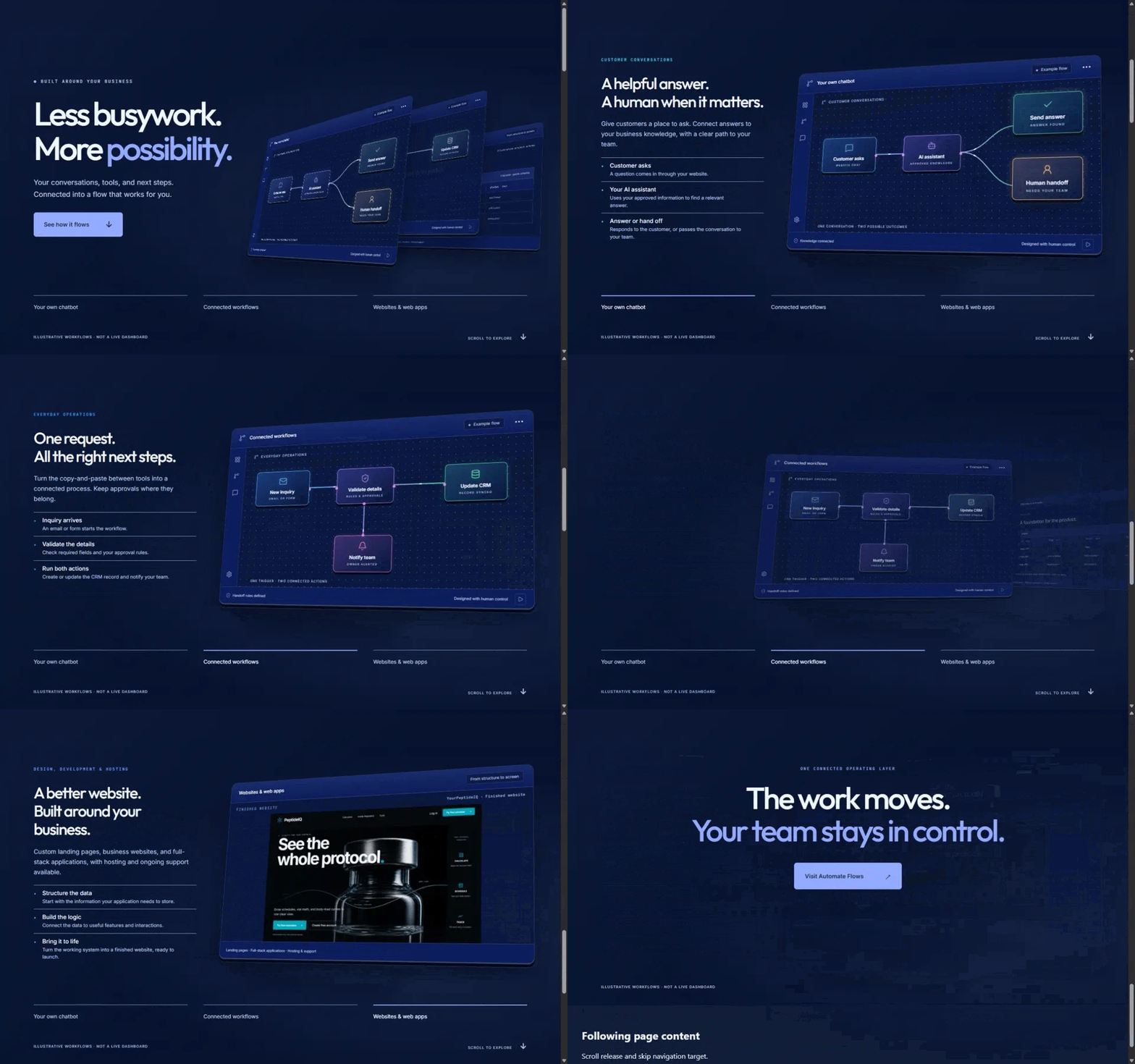
    eyebrow: "BUILT AROUND YOUR BUSINESS",
    title: { lines: ["Less busywork.", "More possibility."], emphasis: "possibility." },
    description: [
      "Your conversations, tools, and next steps.",
      "Connected into a flow that works for you.",
    ],
    cta: "See how it flows",
  },
  chapters: [
    {
      kind: "workflow",
      name: "Your own chatbot",
      tag: "CUSTOMER CONVERSATIONS",
      title: ["A helpful answer.", "A human when it matters."],
      description:
        "Give customers a place to ask. Connect answers to your business knowledge, with a clear path to your team.",
      color: "#22dde7",
      steps: [
        { title: "Customer asks", body: "A question comes in through your website." },
        {
          title: "Your AI assistant",
          body: "Uses your approved information to find a relevant answer.",
        },
        {
          title: "Answer or hand off",
          body: "Responds to the customer, or passes the conversation to your team.",
        },
      ],
      status: "Knowledge connected",
      diagram: {
        nodes: [
          { icon: "message-square", label: "Customer asks", caption: "WEBSITE CHAT", x: 5, y: 34, step: 0, color: "#55baff" },
          { icon: "bot", label: "AI assistant", caption: "APPROVED KNOWLEDGE", x: 35, y: 34, step: 1, color: "#b18aff" },
          { icon: "check", label: "Send answer", caption: "ANSWER FOUND", x: 74, y: 17, step: 2, color: "#55e2a0" },
          { icon: "user-round", label: "Human handoff", caption: "NEEDS YOUR TEAM", x: 74, y: 57, step: 2, color: "#ffc66c" },
        ],
        edges: [
          { from: 0, to: 1 },
          { from: 1, to: 2 },
          { from: 1, to: 3 },
        ],
        note: "ONE CONVERSATION · TWO POSSIBLE OUTCOMES",
      },
    },
    {
      kind: "workflow",
      name: "Connected workflows",
      tag: "EVERYDAY OPERATIONS",
      title: ["One request.", "All the right next steps."],
      description:
        "Turn the copy-and-paste between tools into a connected process. Keep approvals where they belong.",
      color: "#1fa9ff",
      steps: [
        { title: "Inquiry arrives", body: "An email or form starts the workflow." },
        { title: "Validate the details", body: "Check required fields and your approval rules." },
        { title: "Run both actions", body: "Create or update the CRM record and notify your team." },
      ],
      status: "Handoff rules defined",
      diagram: {
        nodes: [
          { icon: "mail", label: "New inquiry", caption: "EMAIL OR FORM", x: 5, y: 19, step: 0, color: "#55baff" },
          { icon: "shield-check", label: "Validate details", caption: "RULES & APPROVALS", x: 35, y: 19, step: 1, color: "#b18aff" },
          { icon: "database", label: "Update CRM", caption: "RECORD SYNCED", x: 72, y: 19, step: 2, color: "#55e2a0" },
          { icon: "bell", label: "Notify team", caption: "OWNER ALERTED", x: 35, y: 65, step: 2, color: "#f07dcc" },
        ],
        edges: [
          { from: 0, to: 1 },
          { from: 1, to: 2 },
          { from: 1, to: 3, out: "bottom", in: "top" },
        ],
        note: "ONE TRIGGER · TWO CONNECTED ACTIONS",
      },
    },
    {
      kind: "build",
      name: "Websites & web apps",
      tag: "DESIGN, DEVELOPMENT & HOSTING",
      title: ["A better website.", "Built around your business."],
      description:
        "Custom landing pages, business websites, and full-stack applications, with hosting and ongoing support available.",
      color: "#6fa3ff",
      steps: [
        { title: "Structure the data", body: "Start with the information your application needs to store." },
        { title: "Build the logic", body: "Connect the data to useful features and interactions." },
        { title: "Bring it to life", body: "Turn the working system into a finished website, ready to launch." },
      ],
      status: "From structure to screen",
      footer: "Landing pages · Full-stack applications · Hosting & support",
    },
  ],
  finale: {
    eyebrow: "ONE CONNECTED OPERATING LAYER",
    title: { lines: ["The work moves.", "Your team stays in control."], emphasis: "Your team stays in control." },
    cta: { label: "Plan your first workflow", href: "#examples" },
  },
  navLabel: "Choose a service",
  footer: {
    disclaimer: "ILLUSTRATIVE WORKFLOWS · NOT A LIVE DASHBOARD",
    scrollHint: "SCROLL TO EXPLORE",
  },
};


export const content: ScrollExperienceContent = {
  ...defaultHeroContent,
  skip: { label: "Skip animated demonstration", target: "#original-end" },
  finale: {
    ...defaultHeroContent.finale,
    cta: { label: "Visit Automate Flows", href: "https://automateflows.io/" },
  },
  chapters: defaultHeroContent.chapters.map(chapter => chapter.kind === "build" ? {
    ...chapter,
    panel: <DevelopmentPanel chapter={{ ...chapter, finishedSite: {
      src: "https://cdn.21st.dev/assets/mirror/a3/a30b6f9e3594c5496d9b4f2049ccc0bdaefb7e037398a6760782ba3aa67d5e1f.png",
      alt: "YourPeptideIQ finished landing page with the See the whole protocol headline and vial artwork",
      label: "YourPeptideIQ · Finished website",
      width: 1292, height: 778,
    } }} />,
    finishedSite: {
      src: "https://cdn.21st.dev/assets/mirror/a3/a30b6f9e3594c5496d9b4f2049ccc0bdaefb7e037398a6760782ba3aa67d5e1f.png",
      alt: "YourPeptideIQ finished landing page with the See the whole protocol headline and vial artwork",
      label: "YourPeptideIQ · Finished website",
      width: 1292,
      height: 778,
    },
  } : { ...chapter, panelLabel: "Example flow", footerLabel: "Designed with human control", diagram: { ...chapter.diagram, gradient: ["#55baff", "#b18aff", "#55e2a0"] as [string,string,string] } }),
};

const brandTheme = {
  "--color-background": "light-dark(#f5f8ff, #06122d)",
  "--color-foreground": "light-dark(#10244a, #f1f7ff)",
  "--color-card": "light-dark(#ffffff, #101e37)",
  "--color-card-foreground": "light-dark(#10244a, #f1f7ff)",
  "--color-muted-foreground": "light-dark(#49617f, #b7cbee)",
  "--color-border": "light-dark(#c7d3e7, #7891b94d)",
  "--color-primary": "light-dark(#2457d6, #91abff)",
  "--color-primary-foreground": "light-dark(#ffffff, #10244a)",
} as import("react").CSSProperties;

const settings = { scrollDistance: 1.35, scrollSmoothing: 0.65 };

export default function DimensionalWorkflowDemo(props: Partial< typeof settings> = {}) {
  const s = { ...settings, ...props };
  return <>
    <style>{`@import url("https://fonts.googleapis.com/css2?family=Inter:wght@400;500;600&family=JetBrains+Mono:wght@400;500&family=Outfit:wght@400;500;600;700&display=swap");`}</style>
    <DimensionalWorkflowHero content={content} motion={{ viewportsPerChapter: s.scrollDistance, scrub: s.scrollSmoothing }} style={{ ...brandTheme, "--font-hero-body": "Inter, sans-serif", "--font-hero-display": "Outfit, sans-serif", "--font-hero-mono": "JetBrains Mono, monospace", "--workflow-panel-background": "#0b1d5a", "--workflow-panel-foreground": "#f4f8ff", "--workflow-panel-muted": "#b4c9ea", "--workflow-canvas-background": "#09183e", "--workflow-panel-border": "#ffffff26" } as import("react").CSSProperties} />
    <div id="original-end" tabIndex={-1} style={{ height: 1 }} />
  </>;
}